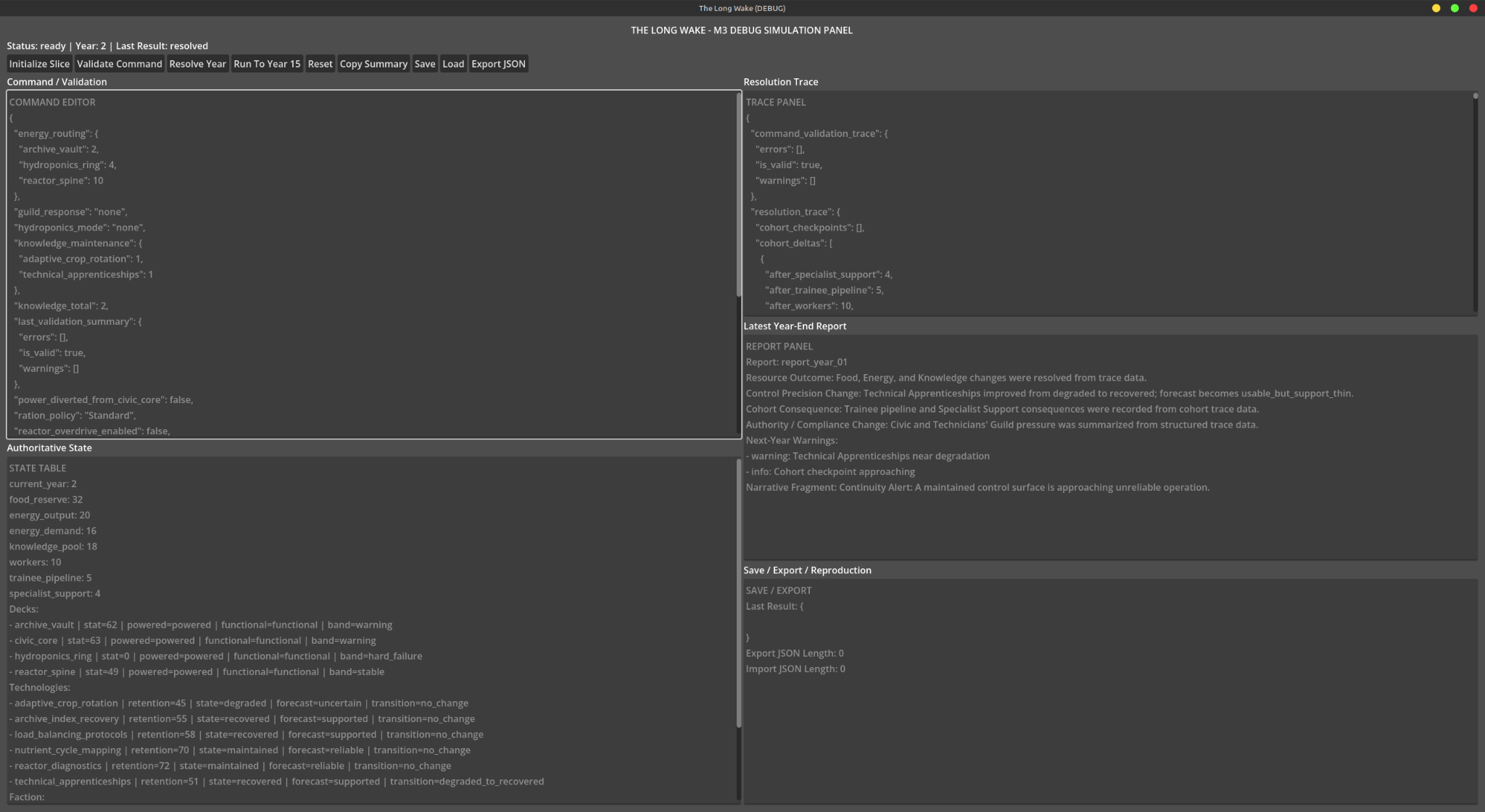
I stopped the styled command-interface work because the M3 debug view was not appearing when I loaded the Godot project. The adapter existed, but the visible labels, buttons, and text areas were missing. A later saved screenshot finally showed the state table, command/validation area, resolution trace, report, and save/export regions together. Seeing them exposed the next problem: I could not edit the command field.
I reported that issue, got a patch, and followed up that the editor was now editable, passed, and committed. That is a development-session report, distinct from what the screenshot itself proves. The value of the debug panel was not its final appearance; it made the yearly simulation and the command path observable before more visual work tried to hide those basic questions.
What the panel was for
The intended controls were Initialize Slice, Validate Command, Resolve Year, Run To Year 15, Reset, Copy Summary, Save, Load, and Export JSON. Beside them were separate views for command input and validation, authoritative state, a resolution trace, the latest year-end report, and save/export information.
That separation mattered. The simulation managers owned the state; the interface should send commands and display results. Editing an output field should not become a back door for changing the simulation.
One pasted debug summary showed the kind of state I needed to inspect:
Current Year: 12
food_reserve: 0
energy_output: 20
energy_demand: 16
knowledge_pool: 78
These are historical debug values, not a balance target or a claim about a current game session.
Visible was only the first hurdle
The first visibility fix exposed a headless-test failure: the test attempted to access status_label.text while the label was still null. The assistant traced it to when the interface was constructed relative to scene-tree readiness and proposed building it unconditionally while guarding against duplicate controls.
I then supplied an image of the visible panel. The historical response identified the title, run controls, command pane, state, trace, report, and export areas. That established the visual form, but another manual check was still needed.
I asked whether input was supposed to work. The buttons appeared to function, yet the command editor would not accept typing. The next correction made the command TextEdit editable and had Validate Command and Resolve Year parse its JSON into the command adapter. Invalid JSON was meant to leave authoritative state untouched. The output panes remained read-only.
The panel first needed to appear, then its command field needed to accept edits. I later reported the edit fix passed and committed. The screenshot shows the interface at one point; that follow-up supplies the separate development result.